Model Deployment: APIs, Containers and Cloud Services
You've got a trained model sitting on your laptop. Now what? You can't tell millions of users "download this Python file and run it locally." You need to serve the model so that applications can request predictions.

In this lesson
You've got a trained model sitting on your laptop. Now what? You can't tell millions of users "download this Python file and run it locally." You need to serve the model so that applications can request predictions.
That's deployment: taking a model and making it available to the applications that need it. Before deployment, you should have validated it properly using the model evaluation techniques from earlier in the course.
What deployment means in the ML context
Deployment is making your model accessible. Someone sends data to your system, your system runs the model on that data, and returns a prediction.
In practice: your model is running on a server somewhere. That server is listening for requests. When a request arrives, the server loads the model (or keeps it in memory), runs inference, and returns the result. The server is available 24/7, handles failures gracefully, and doesn't lose data.
A deployed model is not a one-time prediction job. It's infrastructure that keeps running.
Serving a model via an API
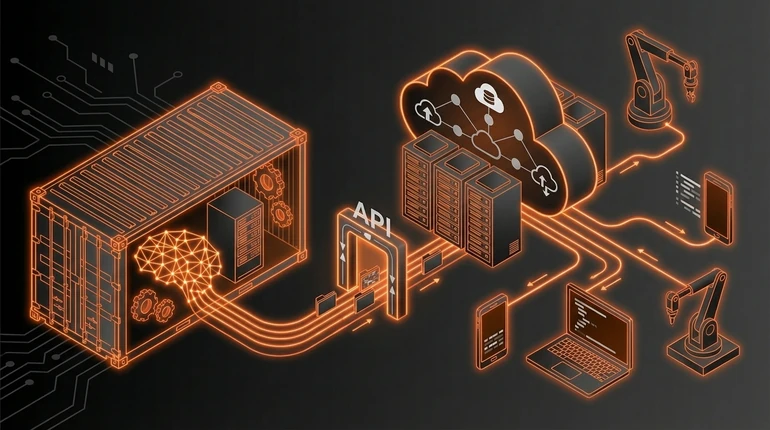
The standard way to serve a model is through an API - an Application Programming Interface. Another piece of software sends a request to your API, and your API returns a prediction.
The basic flow: 1) Client sends an HTTP request with features - "Here are the customer features, predict if they'll churn." 2) Your server receives the request. 3) Your server loads the model (or uses one already in memory). 4) Your server runs inference on the features. 5) Your server returns the prediction in the response.
Simple in concept. You write a small web service - usually in Flask or FastAPI - that loads your model and accepts requests. When it gets a request, it preprocesses the features, runs the model, postprocesses the output, and returns it.
Why this works: any application that can make HTTP requests can use your model. You don't have to ship the model to different applications. You maintain one serving infrastructure.
The trade-off: your model is now a network service, so there's latency. Every request goes over the network. If you need sub-millisecond response times, an API might be too slow. For most use cases, the latency is fine.
What Docker containers are and why they matter
A container is a packaged application environment. You take your code, your dependencies, your model, and package them into a container image. That image can run anywhere - on your laptop, on a server, in the cloud. Docker's documentation is the standard reference for getting started.
Why this matters for ML: reproducibility and portability.
You develop and test your serving code in a container locally. Then you deploy the exact same container to production. No "but it works on my machine" problems. No dependency version mismatches. No confusion about what Python version or system libraries are needed.
Docker is the container technology that became standard. You write a Dockerfile that describes your environment, Docker builds an image, and that image runs on any system with Docker installed. A minimal Dockerfile for model serving looks like:
FROM python:3.10
WORKDIR /app
COPY requirements.txt .
RUN pip install -r requirements.txt
COPY model.pkl .
COPY app.py .
CMD ["python", "app.py"]
You put your model, your serving code, and your dependencies in the container. Then you run it anywhere.
The benefits compound. You can run multiple containers on the same server. You can update a container image and deploy the new one without downtime. You can scale - run ten copies of the same container to handle more traffic. Containers made deploying ML models dramatically easier. Before them, setting up servers and managing conflicting dependency versions was a serious operational burden.
Cloud deployment options
Cloud providers offer services specifically for deploying models.
AWS SageMaker lets you upload a model and it handles serving, scaling, and monitoring. GCP has Vertex AI, Azure has Machine Learning - all similar ideas. You provide the model, they provide the serving infrastructure.
These services handle a lot: scaling, load balancing, monitoring, logging. If you have spiky traffic, they scale up. If traffic drops, they scale down. You pay for what you use.
The trade-off: less control. You're constrained by what the service supports. If your model needs custom preprocessing or special hardware, you might not be able to do it.
You can also deploy containers directly to cloud infrastructure - Kubernetes on AWS, Cloud Run on GCP, Container Instances on Azure. You manage the infrastructure but you get more control.
For beginners: start with a managed service. Upload your model, get a serving endpoint, call it. When you hit limitations, move to containers and infrastructure management. The broader picture of managing models in production is MLOps.
Where beginners go wrong with deployment
They don't think about latency. A model that takes 5 seconds to run works fine in batch processing. It doesn't work as an API serving real-time predictions. Measure inference time early.
They don't plan for failure. What happens when the model service crashes? What happens during a cloud outage? You need redundancy and monitoring. A model that occasionally returns errors is worse than no model at all for some applications.
They put the model weights in Git. Models are large binary files. Git is for code. You need a separate system - a model registry - for versioning, storing, and loading models. Don't put a 500MB model file in your repository.
They forget about monitoring. A deployed model that's not monitored is a black box. Is it still working? Is the data different from training? How are predictions performing? You need to log predictions and monitor performance. The monitoring and drift lesson covers this properly.
They don't think about updates. What happens when you want to deploy a new model? Can you do it without downtime? Can you roll back if the new model is worse? Rolling out to 10% of traffic first, measuring performance, then expanding is standard practice. CI/CD for ML automates this rollout process.
Deployment is running a service. Services need monitoring, updates, and maintenance.
Check your understanding
2 questions - select an answer then check it
Question 1 of 2
What problem does packaging a model in a Docker container solve?
Question 2 of 2
Why should ML model weights NOT be stored in a Git repository?