Claude Code VSC: AI Coding for Beginners
Most guides about Claude Code are written for developers who already know their way around a terminal. This one isn't. Here's what Claude Code VSC is, how to get it running in VS Code, and what you can actually do with it from day one.


In this article expand_more
Most of the guides about Claude Code are written for developers. They assume you know what a terminal is, what a repository means, and why you'd care about something called a CLAUDE.md file. That's a narrow audience.
Claude Code inside VS Code is probably more useful for someone who barely knows how to code than for someone who does it all day. A senior developer already knows what they're doing. A beginner doesn't - and that's where an AI that can explain, write, and fix code alongside you starts to matter.
This is what Claude Code VSC actually is, how to get it running, and what you can do with it from day one.
What is Claude Code VSC?
Claude Code VSC is the official Visual Studio Code extension for Claude Code, Anthropic's AI coding assistant. It puts Claude directly inside your code editor so you can ask it to write code, explain errors, and suggest fixes without switching to a separate browser window.
Anthropic - the company that makes Claude - built Claude Code as a standalone tool for developers. The VS Code extension brings it into the editor itself. VS Code is a free code editor used by millions of people worldwide, and it runs on Windows, Mac, and Linux. If you've never installed it before, that's step one - download it free from code.visualstudio.com.
The extension was released in late 2025. It's worth knowing that Claude Code also works as a command-line tool, but the VS Code extension is the more accessible option if you're not comfortable with terminals. If words like LLM and prompt are new to you, my free 35-lesson AI and machine learning course explains them from scratch.
Claude Code VSC vs Claude.ai: what is the difference?
This comparison matters more than most beginner guides acknowledge.
When you use Claude at claude.ai, you're copying and pasting. Write a question, paste some code, get an answer, copy the answer, paste it back into your file. It works, but the context disappears between conversations and you're always switching tabs.
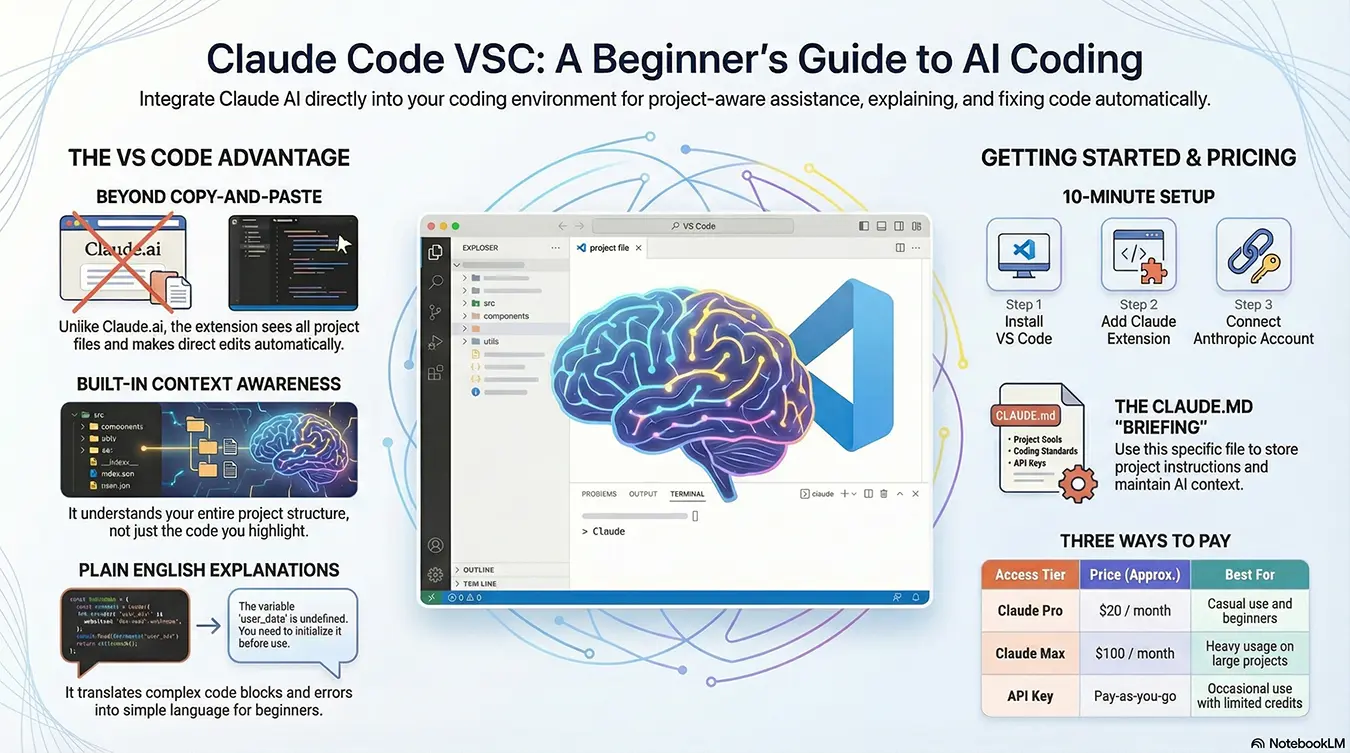
Claude Code VSC lives inside VS Code. It can see your files directly, make edits for you, run commands in the terminal, and hold context across your whole project. You don't paste anything.
For a 20-line script, the difference is minor. For anything with multiple files or a specific project structure, it's substantial. Claude at claude.ai doesn't know what else is in your project. Claude Code VSC does.
How do I install Claude Code in VS Code?
Three steps before anything works:
- Install VS Code. Download it free from code.visualstudio.com. It's the editor itself - if you already have it, skip this.
- Install the Claude Code extension. Open VS Code, click the Extensions icon in the left sidebar (it looks like four squares), search for "Claude Code", and install the extension published by Anthropic.
- Connect your account. You'll need either a Claude Pro or Max subscription or an Anthropic API key with credits loaded. The extension walks you through this when you first open it.
Once it's installed, a Spark icon appears in the Activity Bar on the left side of VS Code. Click it and the Claude Code panel opens. That's where you type your requests.
The setup takes about ten minutes. The extension itself installs in seconds - the time goes on getting your account credentials sorted.
What can Claude Code VSC actually do?
Expectations here tend to go either too high or too low. Coding assistance is the most mature use of AI there is, and it's also where benchmark scores and the one randomised trial of developer productivity disagree hardest, so the hype runs in both directions.
It won't build a complete working app from scratch. That's not realistic for anything beyond a very simple project - and even then, you'll need to test and review what it produces. What it does well:
- Writing functions you'd otherwise have to piece together from Google searches. Give it a clear description of what you need and it'll produce working code to start from.
- Explaining code in plain English. Highlight any block of code, ask "what does this do?" and you get a clear answer. No decoding documentation written for people who already know what they're doing.
- Finding the cause of errors. Paste the error message, ask what went wrong, and Claude Code usually identifies the problem and suggests a fix.
- Suggesting structural improvements. If a script has grown messy, it can suggest how to reorganise it.
- Generating test cases. Useful once your code is working and you want to check it handles edge cases.
The explaining feature alone is worth installing it for beginners. Stack Overflow answers assume a lot of background knowledge. Claude Code doesn't.
Do I need to be a developer to use Claude Code VSC?
Depends what you mean. You don't need a computer science degree or years of professional experience. But if you have no idea what you're trying to build and can't describe it clearly, you'll get generic output that doesn't help much.
Claude Code works across Python, JavaScript, HTML, CSS, and most other common languages. The more specific your request, the better the result. "Add a function that validates an email address" works. "Make it better" doesn't.
One thing worth knowing early: the CLAUDE.md file. It's a plain text file you can put in your project folder that tells Claude about the project - what it does, how it's structured, any preferences you have. Think of it as a briefing document. Beginners who skip this often find Claude seems to lose context between sessions, because it does - unless you give it somewhere to store that context permanently.
Setting one up takes five minutes and makes a noticeable difference.
How much does Claude Code VSC cost?
Claude Code isn't free, which surprises people who've only used the free tier of claude.ai.
Three options:
- Claude Pro subscription - the entry-level paid plan at £15 per month. This gives you access to Claude Code with daily usage limits. A reasonable starting point if you're just trying it out or using it occasionally.
- Claude Max subscription - a monthly plan that gives you heavy usage limits. Currently £90 per month, about $100. Worth it if you're using Claude Code regularly across large projects.
- Anthropic API key with pay-as-you-go credits - you pay per token, which is roughly per word processed. Cheaper for occasional use. You add credits to your account and they're used as you work.
Anthropic does offer a free API trial with limited credits. Use it to test Claude Code before deciding on a paid plan. It's enough to get a real sense of whether it's useful for what you're doing.
There's no permanently free tier for Claude Code specifically. The tool costs money to run and Anthropic doesn't subsidise it past the trial.
What should I try first?
Don't start with a blank project. Open something you already have - a script you've written, a small website, any file with code in it. Ask Claude Code to explain it. Then ask it to add something small: a comment, a function, a bit of error handling.
Watch how it suggests changes. See how you accept or reject them. Give it feedback on what you wanted differently. That back-and-forth is the skill - learning to describe what you want clearly enough that the output is actually useful.
Set up a CLAUDE.md file in your first real project. Write two or three sentences about what the project is and what language it uses. It's not required, but the difference in response quality is noticeable from the first session.
At the time of writing this article Claude Code is considered the best, however it's user preference - you can use Gemini and ChatGPT (OpenAI) too.
If you want to compare Claude against other AI models before committing, the LLM Chat tool on this site lets you ask the same question to Claude, OpenAI, and Gemini side by side for free.